SchoolBase Cloud
Explore
School software for teaching & administrationProduct & perspectives / 2026

Your whole school day.In one place.

Teaching, homework, family communication, administration and staff: School Base Cloud connects your daily work with the right access permissions.

Choose plans ↓

No registration. Fictional sample data.

A look inside the applicationA notice reaches the right family.
schoolbasecloud.com / Administration
School Base Cloud: school office overview in English with fictional demo data
Original English-language demo screenshot · fictional data · October 2026
School officeClass teacherSchool leadershipFees officeFamilyInformation access

From the classroomto the staff record.

Four areas of work, connected to each other. Everyone can find their next task, while your school keeps the overview.

Teaching & homework

Learning continues beyond the lesson.

Materials, assignments and feedback stay connected to teaching. Learners find their work; teachers see submissions and the next step.

Teaching & homework
  • Assignments, deadlines and materials
  • Submissions, feedback and revisions
  • Virtual lessons with your video service
  1. 01Prepare an assignment
  2. 02Submit the work
  3. 03Give feedback

School office & families

From the first enquiry to the next school year.

The school office connects pupil records, family contacts and decisions. Teaching and the family portal use the information released for each role.

School office & families
  • Pupil records, admissions and year transitions
  • Notices and private communication
  • Reports, school fees and the family portal
  1. 01Review admissions
  2. 02Support the school day
  3. 03Close the school year

Staff & payroll preparation

Your team is part of the school, too.

Staff records connect documents, contract history and monthly payroll inputs. Sensitive documents and remuneration data have their own permissions.

Staff & payroll preparation
  • Versioned staff files and contract history
  • Monthly inputs for your payroll office
  • Two-person approval and personal PDF access
  1. 01Maintain staff records
  2. 02Prepare the month
  3. 03Review and release

Permissions & connections

Working together needs the right boundaries.

Teachers, the school office, families and staff use the same product for different tasks. Your school decides who may view, edit or approve information.

Permissions & connections
  • Roles and family permissions by task
  • Your school address and video services
  • Versioned notices and privacy requests
  1. 01Set responsibilities
  2. 02Connect your own services
  3. 03Record decisions

Your school. Your address.

Your own school address leads straight to your accounts. The public website explains the product; your school works in its own environment.

Example addressmeine-schule.schoolbasecloud.com

From a school noticeto shared understanding.

The office publishes a notice. The authorised family acknowledges it. The office can follow that response in the same school system.

  1. 01

    Start in the school office

    Prepare a notice and publish it in the portal for the intended families.

  2. 02

    Switch to the family perspective

    View your children, pending responses, school reports and fees.

  3. 03

    Follow the response back

    An acknowledgement is recorded for the school office. The demo includes three notice scenarios.

Explore this workflow
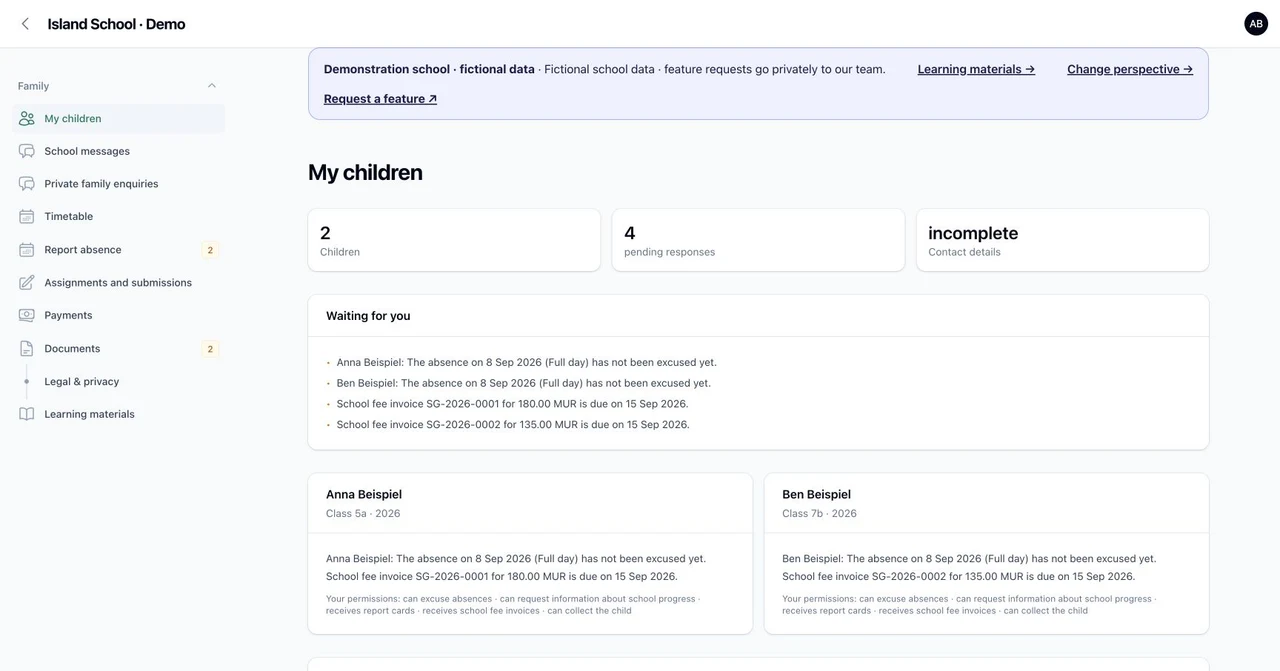
The family sees its next steps
School Base Cloud: family portal in English with fictional demo data
Original English-language demo screenshot · fictional data · October 2026
Information does not end when you press send.

One school day.Six perspectives.

Two public demonstration schools show the same core workflows in Germany and Mauritius. Choose the role whose day you want to explore.

01School office

Open student records and contact rights, check absences and prepare school notices.

Choose this perspective in the demo ↗
02Class teacher

Review classes and courses, enter subject grades and check draft reports.

Choose this perspective in the demo ↗
03School leadership

Review reports before release, school years and responsibilities.

Choose this perspective in the demo ↗
04Fees office

Explore fee schedules, income bands and authorised invoices.

Choose this perspective in the demo ↗
05Family

Discover your own children, pending responses, released reports and invoices.

Choose this perspective in the demo ↗
06Information access

See school information with limited rights. Information access does not grant permission to excuse absences.

Choose this perspective in the demo ↗

This is a shared demo. Use fictional data in the product screens. No real payments or messages to families are sent.

Demo entry points in DE, EN and FR. Some specialised screens and sample data are still in German.

Open demo ↗
Clear decisions

Your school makes the decisions.

Who can do what? Which rules apply? You decide. We configure School Base Cloud for the use we agree together.

Your school retains responsibility for its educational rules.

Read the data and decision brief
  1. You set the rules.

    Roles, report templates and school rules are agreed with your team. The software does not replace legal or educational review.

  2. We define the scope.

    Deliverables and boundaries are documented before implementation. New requirements are assessed together and agreed separately.

  3. We test your school day together.

    Acceptance follows your agreed school scenarios. Outstanding issues remain visible until they are resolved.

One product.Room for your school.

Four school sizes, EUR or MUR, monthly or annual billing. Complete migration and the first guided workflow are free; additional setup and Product Partner are optional.

Choose plans ↗

Additional setup & Development support ↓

How your school is activated ↓

Your proposal / School Base Cloud

01

Regular product price

Regular product price

Four sizes based on active pupils. EUR or MUR, monthly or yearly. No additional per-user price for staff and families.

02

Development support

Optional monthly add-on

Optional 2 or 6 hours per month for technical changes and development questions, in addition to a monthly school subscription. Scope and timing are agreed.

03

Move for free and start together

Included at no extra charge

We migrate all your data free of charge and guide your first everyday workflow without an onboarding fee. Export review, field mapping, complete transfer and joint reconciliation are included, whether you pay monthly or annually. Additional setup, further training and custom development are optional and quoted separately in advance.

Book online: choose your plan, currency and billing cycle. Set up your school after confirmed payment.

Prices exclude tax. Applicable taxes and the final total are shown before payment.

Additional setup & Development support

Additional setup

690 EUR / 37 990 MUR · one time

Optional: up to 6 hours of additional setup plus 2 further training sessions. One-time supplement to the school subscription. Complete data migration and your first guided workflow are already free and do not require this package.

Product Partner: your personal developer

89 EUR / 4 790 MUR · per month

Product Partner is optional personal product development for your school. A developer agrees the scope of a fitting feature with you.

At least one wish feature for your school every month: you name it, we estimate it up front, then build, test and deliver it. Larger work is split into monthly steps; bug fixes remain part of your subscription. Only with a monthly school subscription, billed additionally and cancellable monthly. The commitment applies to every paid month.

2 hours per month

299 EUR / 16 490 MUR · per month

Optional 2 or 6 hours per month for technical changes. Scope, scheduling and unused hours are agreed in writing before booking. Bug fixes are part of the school subscription.

6 hours per month

749 EUR / 41 290 MUR · per month

Optional 2 or 6 hours per month for technical changes. Scope, scheduling and unused hours are agreed in writing before booking. Bug fixes are part of the school subscription.

How your school is activated

  1. Choose your plan, currency and billing cycle. Add-ons are booked only when selected. Review terms, tax and the total before payment.
  2. After confirmed payment, your personal activation link takes you to setup. Choose your school name and an available school address there. Do not share this private link publicly.
  3. Once setup is complete, the first administrator receives a password setup link at the email address used for the purchase. Your school administration grants further access.

Already set up? Find your school’s address. Public demos are separate.

School login ↗

Your school has its own ways.We help develop them.

Family communication, management reports or a particular approval process: bring us your requests. Personal development support combines a named contact with priority planning.

Useful and technically feasible? We start implementation after your approval. We confirm scope, price and delivery date beforehand.

Request a feature

The request channel is private. Please use your real reply address here. Submitting a request does not place an order.

  1. 01

    Understand

    Describe your current workflow and the outcome you need. Together we define what a completed solution must do.

  2. 02

    Agree the delivery

    Receive scope, effort, price and a delivery date before commissioning. Larger developments are quoted separately.

  3. 03

    Try early

    We deliver small, reviewable increments. With personal support, your development receives priority scheduling.

  4. 04

    Accept together

    You test the agreed workflow. Rollout, maintenance and future requirements are part of the conversation.

The specific delivery date depends on scope, dependencies and reserved capacity. Agreed milestones make delivery accountable.

Fewer follow-ups.More room for school.

Two glimpses of school life: keeping families connected and opening up learning through illustrated materials.

Mauritius / EN00:33

You sent the message. Did it reach home?

A notice from the school office, the family portal and recorded acknowledgements.

Read the film content

You sent the message. Did it reach home?

Paper notes. Follow-ups. Uncertainty.

One notice. A clearer connection.

Reach families. See who has acknowledged.

Keep families connected. Keep school moving.

Explore the Mauritius demo. School Base Cloud.

Mauritius / EN00:33

One topic. Three ways in.

16 subjects with images, activities and prepared versions in English, French and German.

Read the film content

Curiosity travels. Language should open doors.

Find a resource. Change the language. Keep the meaning.

One topic. Three ways in.

16 subjects. Three languages. Images and activities.

Open the conversation. Let learning grow.

Explore the learning materials. School Base Cloud.

The films show fictional demo data and prepared sample materials.

Tested with your workflows. Introduced together.

We migrate all your data free of charge and guide your first everyday workflow without an onboarding fee. Export review, field mapping, complete transfer and joint reconciliation are included, whether you pay monthly or annually. Additional setup, further training and custom development are optional and quoted separately in advance.

Scope and operational boundaries

Prepared in the demonstration school

  • 24 students, three classes and six role-based sign-ins
  • Absences, draft reports and released report versions
  • Fee invoices, payment records and parent-portal tasks

To accept before real operation

  • Hosting, agreements, data protection and recovery
  • Your report templates, permissions and school policies
  • Payment and bank processes; a demo is not bank acceptance

Not promised by default

  • Automatic migration from every existing school system
  • Coverage of every jurisdiction and school type
  • A fully accepted all-in-one suite without implementation
Open introduction and product details
Guided implementation

A good start takes more than a login.

We support setup around your workflows, clear responsibilities and joint acceptance. Real student data belongs only in the approved operational environment.

  1. 01

    Understand the starting point

    We examine your most pressing administrative bottleneck, the roles involved and the data sources you use today.

  2. 02

    Agree scope and responsibilities

    Users, data, permissions, edge cases, non-goals and acceptance scenarios are documented before implementation begins.

  3. 03

    Test your scenarios

    We configure existing workflows for the agreed use and test representative situations, initially using fictional data.

  4. 04

    Accept it together

    Named owners assess the usable slice. Open points remain documented; only then do you decide whether there should be a next step.

Is this right for you?

Two countries. Your school comes first.

Independent and private schools are our primary focus; state schools are also part of our intended audience. Implementation follows your school’s actual structure and workflows.

Germany

  • Configure grading, school-year periods and staff responsibilities
  • Approve report templates and rules for the specific school
  • Agree fee workflows only where they are needed
Open demo · EUR ↗

Mauritius

  • Configure the school’s language, time zone and currency
  • Agree report and assessment rules with the school
  • English and French demo entry; administrative screens are not yet fully translated
Open demo · MUR ↗
Proven domain core

How School Base Cloud separates relationships and permissions.

This model view explains separate contact permissions using fictional cases. It is not a product interface. Open the actual application in the public demonstration schools for Germany and Mauritius.

fachmodell.schoolbasecloud.example

Anna Example — child, contacts and responsibilities

3Relationships
5Separate permissions
1Primary contact
Person record
Anna Beispiel
Student link
separate from the person record
Primary contact
Maria Example · call first
Permissions
set on each relationship

The person record and student record remain separate. Each relationship carries its own responsibilities.

Concept view with fictional sample data, derived from the tested domain model. Not a real school and not a live demo.

Frequently asked questions

What you need to know before an introductory call.

What does moving from our existing school system cost?

We migrate all your data free of charge and guide your first everyday workflow without an onboarding fee. Export review, field mapping, complete transfer and joint reconciliation are included, whether you pay monthly or annually. Additional setup, further training and custom development are optional and quoted separately in advance.

Is a video service included in the school subscription?

No. Your school provides its own service. BigBlueButton connects through its API; Teams, Zoom and Google Meet open through your existing meeting links.

Are video lessons recorded?

The built-in BigBlueButton integration starts rooms without recording. For external meeting links, the settings of your chosen video service apply.

Can schools without tuition fees use it?

Yes. The agreed scope follows your school’s needs. Fee workflows are relevant only where your school requires them.

Can every family contact see everything about a child?

No. Visibility and actions follow the recorded permissions. Information access alone does not allow a contact to excuse absences or view invoices.

Does School Base Cloud replace our payroll system?

No. Your payroll system calculates pay. School Base Cloud supplies inputs, imports reviewed results and makes approved original PDFs available to staff.

Is there a direct DATEV or MRA integration?

Currently, there is general CSV exchange and PDF document handling. Direct DATEV API transfers and MRA filings are not enabled. We check the exchange format with your provider.

Do we need a central School Base video service?

No. For now, each school uses its own connection. A conference service operated by us is not currently part of the offer.

Where do existing schools sign in?

At their own school address. If you do not have it, school login helps you find an existing school using its short name. Public demonstration schools are separate.

What can we see now?

Two public demonstration schools: Germany with EUR and Mauritius with MUR. Switch between six roles without registering and try the administration and parent portal. All records are fictional. This is a shared demo, not a customer tenant; please do not enter personal data.

Base Cloud family

Five products, each for a different organisation.

Does your organisation also run a college or club? Campus Base Cloud handles higher education and learning; Club Base Cloud manages members and fees. Choose the right product for each organisation, then add Product Partner to that subscription if needed.

School software for teaching & administration

A different viewof your school day.

Original English-language demo screenshot · fictional data · October 2026